EML (Electronic Message Format) is a single-file format designed to store and share email messages. But you need a specified email client like Outlook, Thunderbird, or Apple Mail to access these files with complete information.
On the other hand, MHT (MIME HTML Archive) file stores entire web content or email messages in a single file. Moreover, it facilitates easy accessibility across all devices and web browsers, be it Mozilla Firefox, Google Chrome, or Microsoft Edge.
As MHT files offers wide range of benefits, users have started shifting from EML to MHT. But performing any process without proper knowledge of steps can leave your data in a risky situation. For a safe conversion, we have crafted a detailed guide with tried and tested methods. Let’s know more about why a user needs to convert EML to MHT files.
Why Convert EML to MHT?
MHT files offer multiple smart benefits over EML files, some of which are:
- MHT files can easily be opened in any web browser.
- Ideal format for long-term archiving.
- Maintains original formatting and structure.
- Saves attachments with emails.
- No need for any email client to view them.
- Easy to share individual emails across devices.
- Can be accessed on mobile phones.
- Suitable for saving legal evidence.
Backups: Why They are Crucial Before Conversion
Backing up all the data before conversion is very crucial to prevent any data disaster. There is no guarantee that your data will be converted successfully without any loss. Moreover, sometimes manual methods lack attachments handling feature, creating difficulties.
Convert EML to MHT files – Manual Methods
There are two manual methods available to convert EML to MHT. You can follow any as per your needs:
Method 1. Convert Files Using Outlook
You can easily convert EML to MHT using Outlook. Here are the detailed steps to do it:
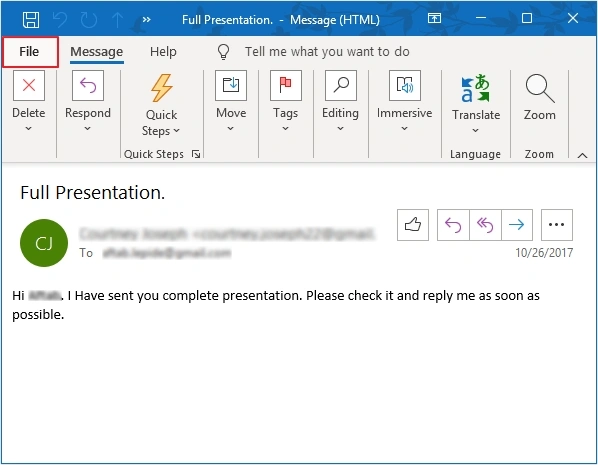
- In Outlook, open the required EML file in a separate window and click File.
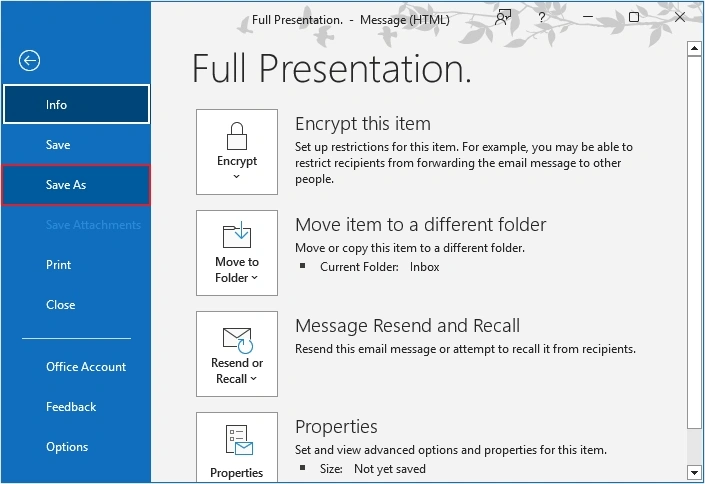
- Click on the Save As
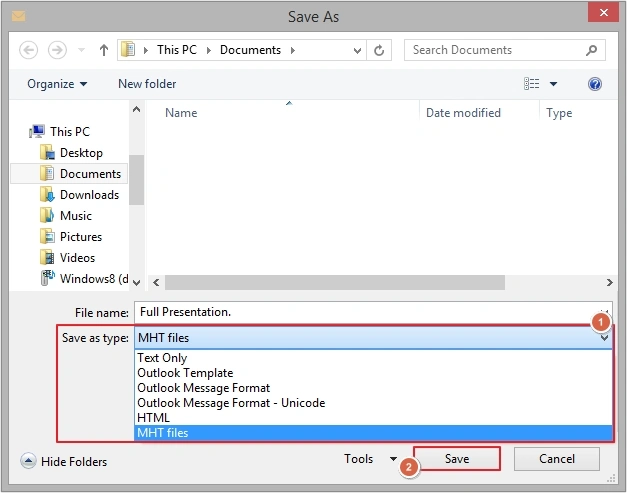
- Select MHT files as Save as type and click Save.
Method 2. Using Microsoft Word
Even Microsoft Word offers a way to convert EML to MHT. Follow the below steps to carefully convert your data:
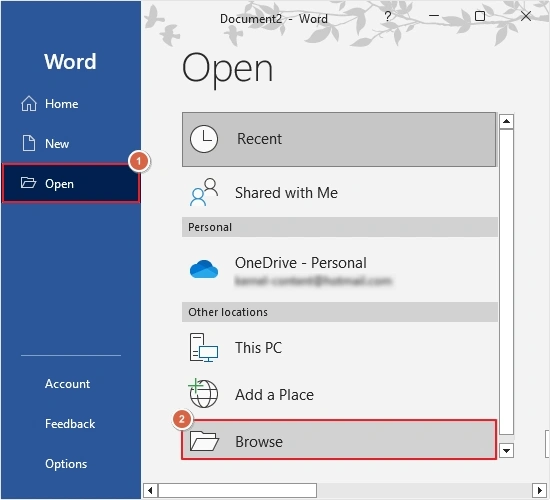
- Open Microsoft Word and click Open, then Browse.
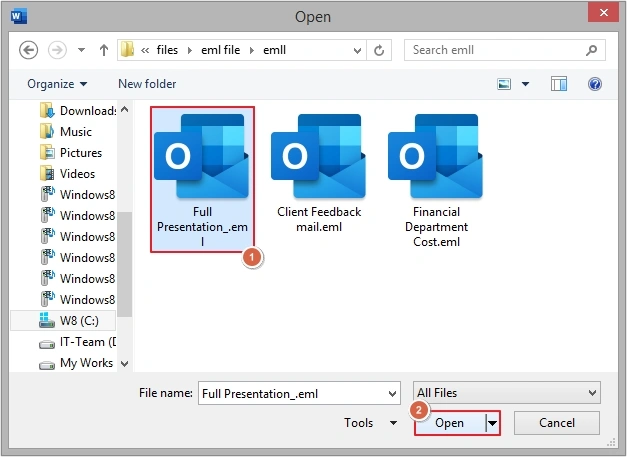
- Select required EML file and click Open.
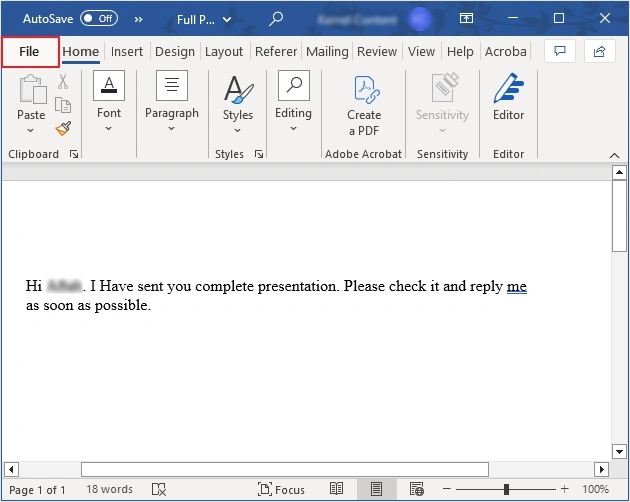
- Click on File.
- Click Save As, then Browse to provide saving location.
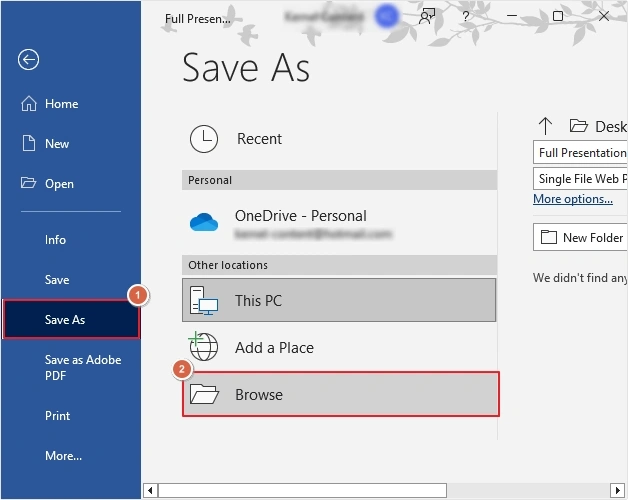
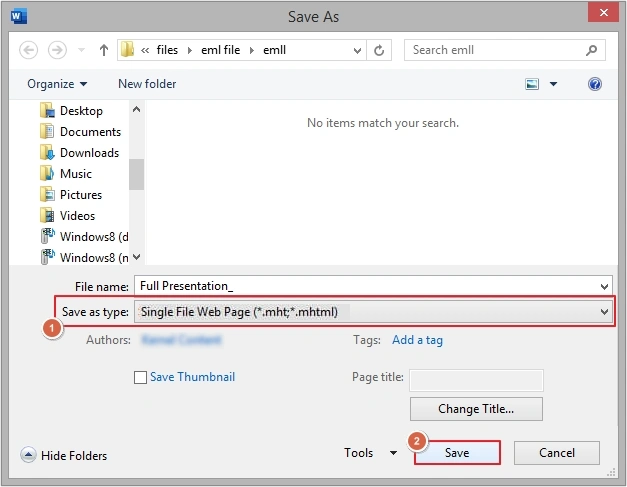
- Provide location, then select Single file Web Page (.mht, .mhtml) in Save as type and click Save.
Limitations of Manual EML to MHT Conversion
Manual conversion comes with various limitations with them, such as:
- You can convert only one EML email at a time into MHT format.
- Repetitive and time-consuming process.
- Doesn’t guarantee 100% successful conversion.
- Users might leave their important data behind.
- You need Outlook installed on your system.
- Not ideal for bulk conversion.
- Might disrupt email formatting, links, and structure.
There are multiple issues that come in between the conversion. To troubleshoot them, it is recommended to use a professional EML to MHT converter tool.
EML to MHT Converter: Professional Approach to Convert Files
The only way to surpass all the limitations of manual methods is by using an automated tool for hassle-free and accurate conversion. Our KDR EML File to PST Converter Tool offers an option to convert EML to MHT files in bulk without any restrictions. Be it a business or an individual looking to convert EML files into MHT, this software is a one-stop solution for all.
Benefits of using EML to MHT Converter tool:
- Allows adding single or multiple files in a single operation, perfect tool for bulk conversion.
- Supports both EML and EMLX files as source and converts them smoothly.
- Multiple advanced filter options to customize the resultant data.
- Users can save email attachments separately on their local system.
- Focuses on folder hierarchy retention throughout the conversion process.
- 100% error-free conversion results within a few simple clicks.
- Convert EML to MHT using free trial and save 10 items per folder for free.
Conclusion
Converting EML to MHT manually is a bit complicated because you need to repeat it multiple times, and it is not ideal for converting hundreds or thousands of files. Thus, to fulfill the bulk conversion needs, it is advisable to use the recommended EML to MHT Converter tool and make your data conversion fast as well as secure.
Frequently Asked Questions
A. You can use our recommended EML to MHT converter tool to convert bulk EML to MHT files.
A. Yes, you can convert EML to MHT manually using Outlook and Microsoft Word.
A. Yes, converting an EML file to MHT brings lots of benefits, like you can view them anywhere, anytime, using a web browser. Moreover, your emails will be saved in original structure.