Both EML and PDF are formats used to store and share email messages with others. But they are not same. EML files store messages in raw form, whereas PDFs store text in fixed layout. For businesses that share sensitive data, a secure format is required. And here, PDF files stand as the ideal format.
In this guide, we will share the methods to convert EML to PDF. First, let’s compare both formats for a clearer view.
Comparing EML and PDF Formats
Below is a detailed comparison of EML and PDF to differentiate between the two formats easily:
|
Basis |
EML (Electronic Message Format) |
PDF (Portable Document Format) |
|
Purpose |
Designed to store and transfer email messages. |
Designed for universal sharing and presenting documents in a fixed layout. |
|
Accessibility |
You need a dedicated application to access EML files like Outlook and Thunderbird. |
PDFs are universally acceptable via Adobe Acrobat, any web browser or on any device. |
|
Content handling |
Contains raw email messages like text, images, attachments, metadata, etc. |
Contains formatted text such as text, tables, links, forms, images, etc. |
|
Editing and Security |
EML files can easily be edited through a text editor if opened with it. |
PDFs can be password-protected, making them non-editable and ideal for legal archives. |
|
Use case |
To keep emails in original state, archive messages, migrate emails between email clients. |
To share documents securely or to preserve complex layouts (like invoices). |
Why Convert EML to PDF?
With the above-mentioned comparison, we can visibly see the difference between the two formats (EML and PDF). Before moving towards the methods to convert EML to PDF, first, let’s know why we need to perform the conversion:
- PDF is the best format for storing and archiving legal or sensitive email messages.
- Users need a dedicated email client like Outlook or Thunderbird to access EML files, making it hectic for users.
- PDFs preserve email messages in their original layout and design, making them look exactly as intended.
- EML files are less secure in comparison to PDFs password-protection feature, encouraging users to shift from EML to PDF document.
Manual Methods to Convert EML to PDF Files
There are two manual methods to convert EML files to PDF format. Let’s see the steps for both:
Method 1. Using Outlook
Outlook offers the option to save EML files as PDF. Here is how you can do it:
- Open Outlook, then drag and drop the desired EML files in it.
- Double click EML file to open it in a separate window.
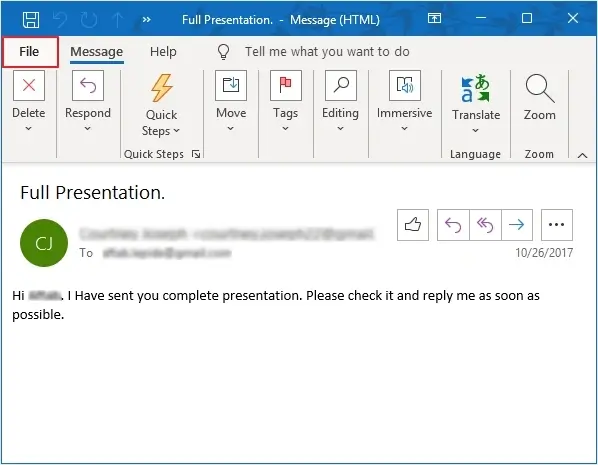
- Click Print >Print Options.
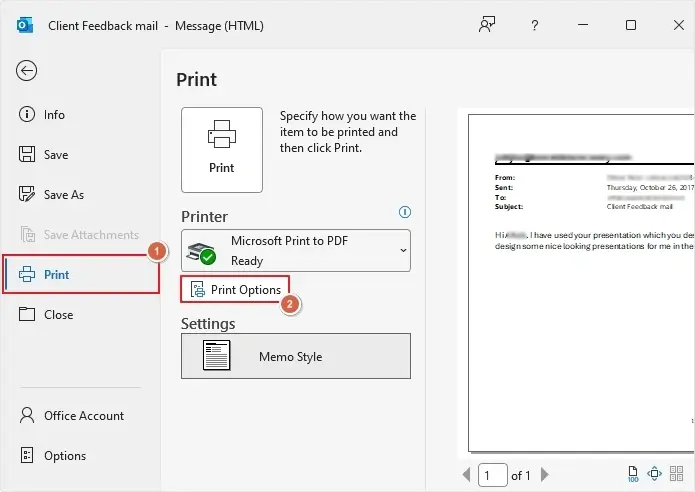
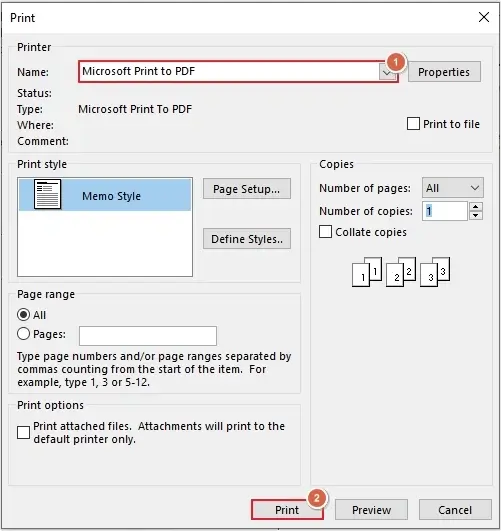
- Select Microsoft Print to PDF >Print.
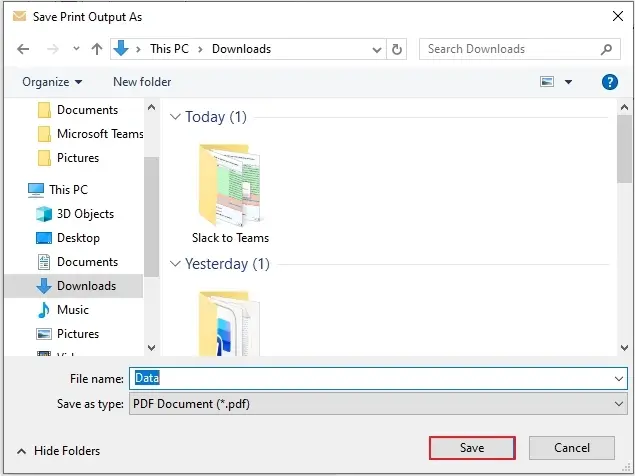
- Define saving location and provide name, then click Save.
Method 2. Using Thunderbird
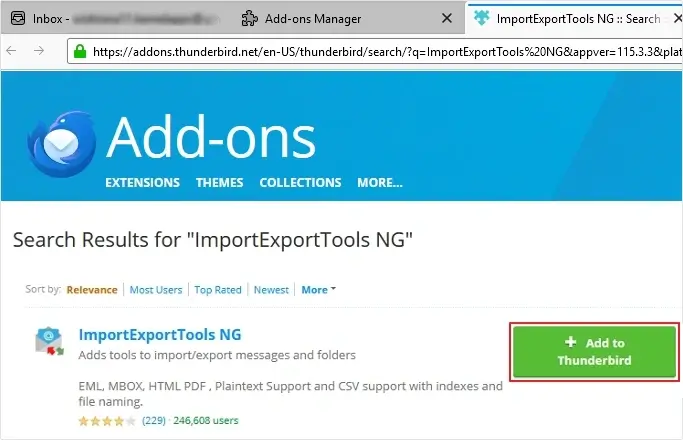
With Thunderbird’s ImportExportTools NG add-on, you can save EML as PDF. Here are the steps to do it:
- Open Thunderbird > click three-bars >Add-ons and Themes >search ImportExportTools NG >click Add to Thunderbird.
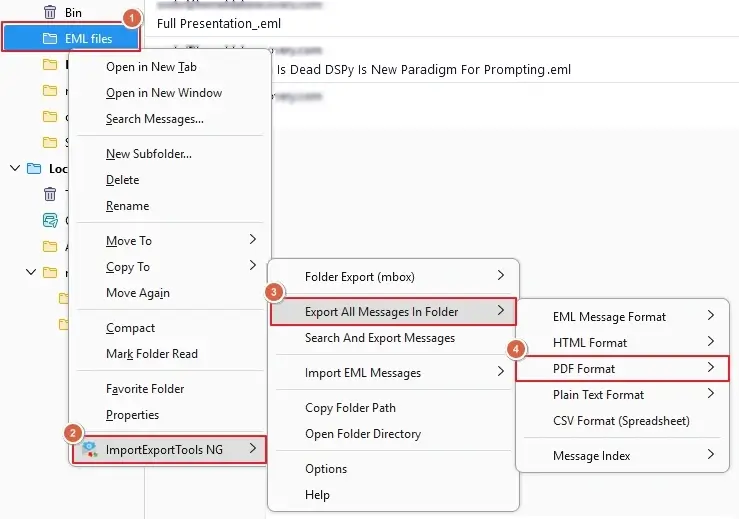
- Right-click on EML folder >ImportExportTools NG >Export All Message In Folder >PDF Format.
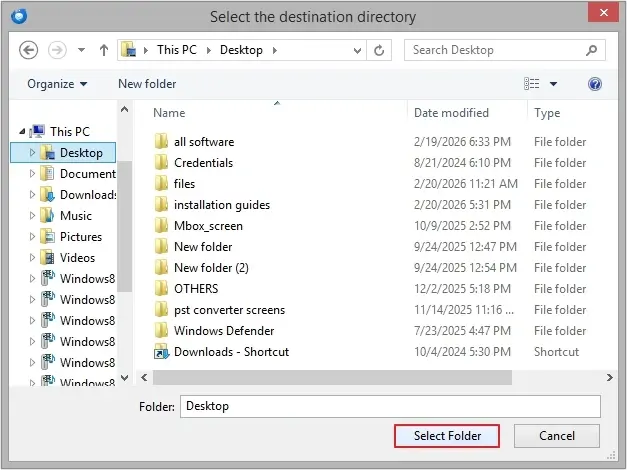
- Provide destination and click Select Folder.
Note: With manual methods, you can save only a few EML files.
Professional EML to PDF Converter Tool
As discussed, manual methods are ideal for only a few EML files. Moreover, they are very time-consuming, lengthy, and have a higher chance of corruption and data loss. But if you have thousands of EML files, then what will you do? In that case, you need a EML to PDF Converter tool. Our Professional EML to PST Converter is the best software to convert bulk files without data loss. Explore its benefits for secure conversion:
- Allows adding both EML and EMLX files for conversion.
- Supports bulk EML to PDF conversion in a single operation cycle.
- Advanced date filter for selective data conversion.
- Multiple filters to save attachments precisely.
- Saves logs for failed items (only in special cases).
- User-defined saving location for easy navigation.
- File naming convention feature to save files with customized name.
- It preserves original data structure and formatting throughout the process.
- Comes with a free EML to PDF converter version to convert 10 items per folder.
Conclusion
There are many reasons to convert EML to PDF, which we have discussed in this blog. We have also discussed two manual methods along with the best professional EML to PDF Converter free tool. The software offers multiple smart filters and features for a quick and secure conversion. Take the free trial today.
Frequently Asked Questions
A. To convert multiple EML files into PDF at once, we advise using a professional tool like KDR EML to PST Converter tool.
A. Yes, you can convert EML to PDF without software using Outlook and Thunderbird.
A. To convert EML to PDF with attachments, use a professional EML to PDF Converter tool.